


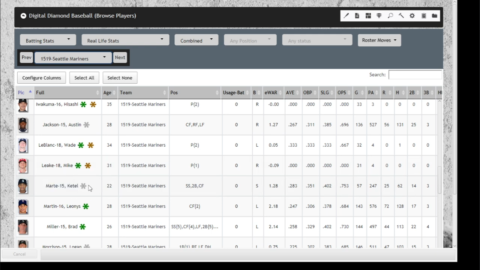
1. Open a Different Library – New Library Group – create a new group called “Year-by-Year Import”
2. Install a Library – select the season library that you wish to select players from. The library will be listed in the Favorites group by default. Select MOVE and move the library to the Year-by-Year Import group. Rename the library to “YYYY-Import-MLB” where YYYY is the year (such as 1990-Import-MLB).
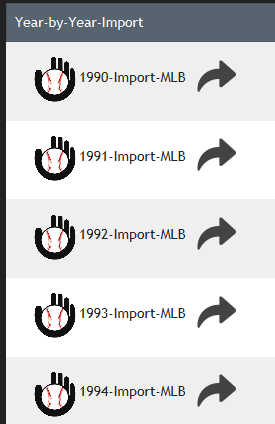
3. Repeat step 2 for each season library that you wish to import players from. For example, let’s say I want to create a library that contains player-seasons from 1990 through 1994. I would perform step 2 five times and the result would look like this:

optional – if you wish to use the combined statistics for the imported players who played for multiple teams in a given season, go to Player Editor – Edit All – Combine All Duplicate Players. Those individuals will be listed on the TOT team with their merged statistics.
4. Library – New Library – type the name of your new library. click OK. Optional – move your new library into a group. Click on your new library name to open it.
5. Team Editor – create your teams by entering the City/State, Name, Year and Tag. Optional – select a team logo, ballpark (this would require importing or creating ballparks first).
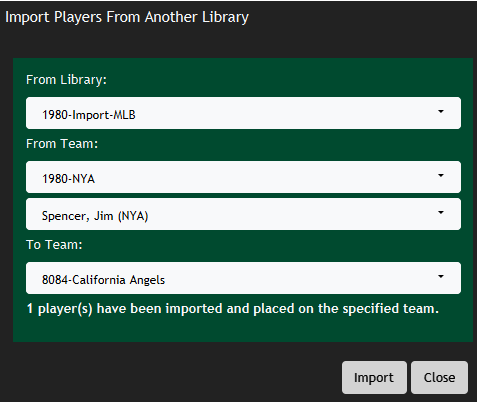
6. Player Editor – Import Players From Another Library
Select the From Library (one of the Year-Import-MLB libraries created in step 2)
Select the From Team (the team that the player actually played for in the specified year – be sure to check the TOT team first for combined players!)
Select the Player(s) to be imported from that team.
Select the To Team – where the imported players will be drafted to.
Click IMPORT. Repeat process until all players are imported and 40-man rosters for each team are filled.

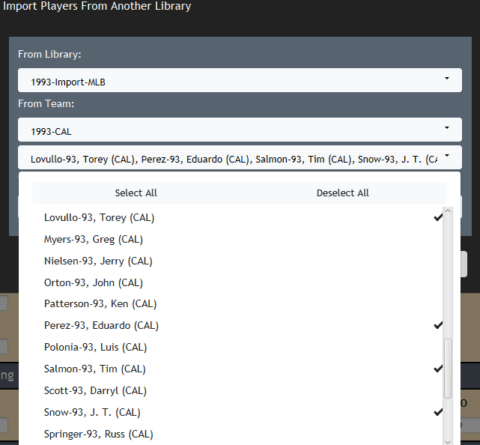
If you wish to import multiple players on the FROM TEAM, you may select or deselect them, then click IMPORT.


References:
Digital Diamond Baseball – user-created custom libraries
Digital Diamond Dugout (Tapatalk forum)
SABR Stay at Home – Mark Cohen


